
Please note that zAgileConnect license is required for a user to invoke this API. The methods will throw a zsfjira.ZC.ZCApiLicenceException when executed by a user without a zAgileConnect license
Link a Jira Issue to a Case
Use the following method to create a Link between a Case and an Issue (using Case ID and Issue Key):
zsfjira.ZC.Issues.linkIssue('TP-1',Id.valueOf('5000H00000xLWAd'));
Error Handling
The operation will return an object containing the result of the Link operation including any errors.
zsfjira.ZCBeans.IssueLinkUnlinkResult result = zsfjira.ZC.Issues.linkIssue('TP-1',Id.valueOf('5000H00000xLWAd'));
if(result.hasError()){
    System.debug(System.LoggingLevel.ERROR,result.errorMessage);
}
License Handling
All operations included in this API require the user to have a valid zAgileConnect license. Try/Catch block below shows how to catch exceptions.
try{
    zsfjira.ZCBeans.IssueLinkUnlinkResult result = zsfjira.ZC.Issues.linkIssue('TP-1',Id.valueOf('5000H00000xLWAd'));
}catch(Exception exe){
    ...
}
Posting Errors
You can publish the errors to the Case by invoking the method postErrorMessages
Id caseId = Id.valueOf('5000H00000zdi30');
zsfjira.ZCBeans.IssueLinkUnlinkResult result = zsfjira.ZC.Issues.linkIssue('JP-1',caseId);
zsfjira.ZC.Issues.postErrorMessage(caseId,result);
Bulk Operations
Please use the Bulk operations if you want to Link multiple issues. You can not Link multiple issues by iterating through the single Link operations.
Create a set of strings holding the Issue Keys to be linked:
Set<String> issueKeys=new Set<String>();
issueKeys.add('TP-1');
issueKeys.add('TP-6');
issueKeys.add('TP-7');
Use the method linkIssues():
List<zsfjira.ZCBeans.IssueLinkUnlinkResult> results = zsfjira.ZC.Issues.linkIssues(issueKeys,Id.valueOf('5000H00000xLWAd'));
Similar to single Link, the method will return a list of results.
for(zsfjira.ZCBeans.IssueLinkUnlinkResult result:results){
    if(result.hasError()){
        System.debug(System.LoggingLevel.ERROR,result.errorMessage);
    }
}
Link Issues via Process Builder
Select the Apex class ‘Link Issue’ and specify a Case ID and Issue Key:
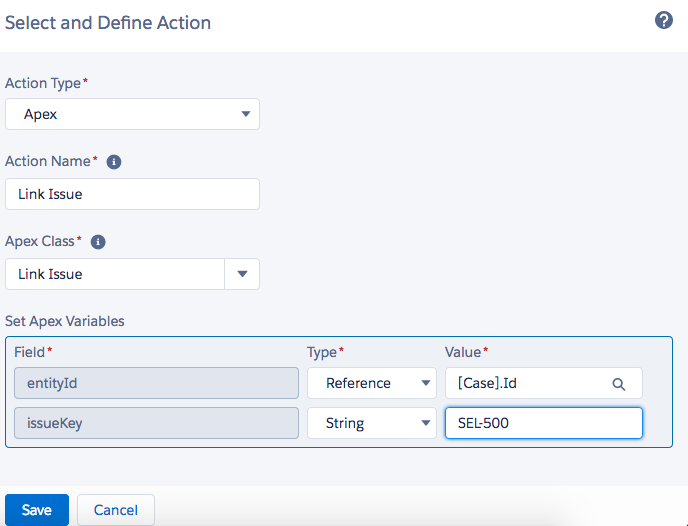
Any errors during the Link operation will be notified through email
Unlink a JIRA Issue
To Unlink a Jira Issue from a Case, use the following method with Issue Key and Case ID:
zsfjira.ZC.Issues.unlinkIssue('TP-1',Id.valueOf('5000H00000xLWAd'));
Error Handling
The operation will return an object containing the result of the Unlink operation.
zsfjira.ZCBeans.IssueLinkUnlinkResult result = zsfjira.ZC.Issues.unlinkIssue('TP-1',Id.valueOf('5000H00000xLWAd'));
if(result.hasError()){
    System.debug(System.LoggingLevel.ERROR,result.errorMessage);
}
License Handling
The API requires a valid zAgileConnect license. You can catch the exception, if needed.
try{
    zsfjira.ZCBeans.IssueLinkUnlinkResult result = zsfjira.ZC.Issues.unlinkIssue('TP-1',Id.valueOf('5000H00000xLWAd'));
}catch(Exception exe){
    ...
}
Posting Errors
You can post the errors as a result of the operation to the parent entity (Case).
Id caseId = Id.valueOf('5000H00000zdi30');
zsfjira.ZCBeans.IssueLinkUnlinkResult result = zsfjira.ZC.Issues.unlinkIssue('JP-1',caseId);
zsfjira.ZC.Issues.postErrorMessage(caseId,result);
Bulk Unlink Operation
Create a set of strings containing the Issue Keys:
Set<String> issueKeys=new Set<String>();
issueKeys.add('TP-1');
issueKeys.add('TP-6');
issueKeys.add('TP-7');
Use the method unlinkIssues() with the set of Issue Keys from above and the Case ID:
List<zsfjira.ZCBeans.IssueLinkUnlinkResult> results = zsfjira.ZC.Issues.unlinkIssues(issueKeys,Id.valueOf('5000H00000xLWAd'));
The method returns a list of results from the operation:
for(zsfjira.ZCBeans.IssueLinkUnlinkResult result:results){
    if(result.hasError()){
        System.debug(System.LoggingLevel.ERROR,result.errorMessage);
    }
}
Unlink Issues via Process Builder
Select the apex class ‘Unlink Issue’ and specify a Case ID and Issue Key:
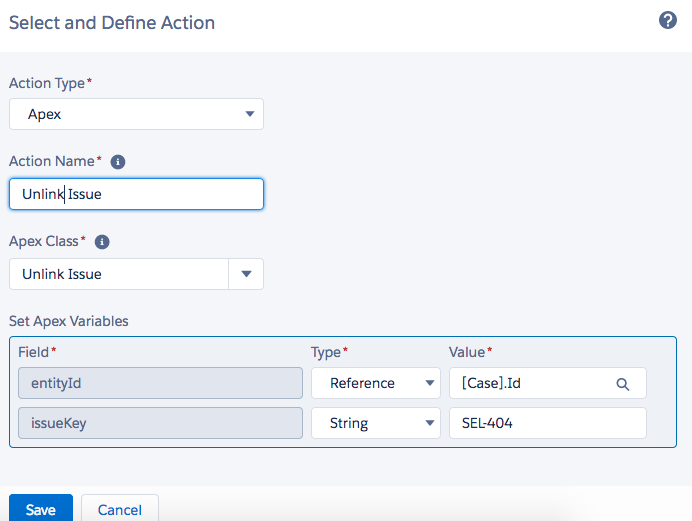
Errors during the Unlink operation are notified via email
Delete a Jira Issue
To Delete an Issue, call the following method with an Issue Key and an Entity ID:
zsfjira.ZC.Issues.deleteIssue('TP-1',Id.valueOf('5000H00000xLWAd'));
Only Jira Issues created from the Salesforce entity specified in the method may be deleted.
Error Handling
The Delete operation will return an object containing the result of the operation.
zsfjira.ZCBeans.IssueDeleteResult result = zsfjira.ZC.Issues.deleteIssue('TP-1',Id.valueOf('5000H00000xLWAd'));
if(result.hasError()){
    System.debug(System.LoggingLevel.ERROR,result.errorMessage);
}
License Handling
The API requires a valid zAgileConnect license in order to execute. You may catch the exception if needed.
try{
    zsfjira.ZCBeans.IssueLinkUnlinkResult result = zsfjira.ZC.Issues.deleteIssue('TP-1',Id.valueOf('5000H00000xLWAd'));
}catch(Exception exe){
    ...
}
Posting Errors
You can post the errors to the parent entity (Case).
Id caseId = Id.valueOf('5000H00000zdi30');
zsfjira.ZCBeans.IssueLinkUnlinkResult result = zsfjira.ZC.Issues.deleteIssue('JP-1',caseId);
zsfjira.ZC.Issues.postErrorMessage(caseId,result);
Bulk Operations
Create a set of strings holding the Issue Keys:
Set<String> issueKeys=new Set<String>();
issueKeys.add('TP-1');
issueKeys.add('TP-6');
issueKeys.add('TP-7');
Use the method deleteIssues() with the above set and the Case ID:
List<zsfjira.ZCBeans.IssueDeleteResult> results = zsfjira.ZC.Issues.deleteIssues(issueKeys,Id.valueOf('5000H00000xLWAd'));
Iterate the returned list in order to get the results of the Unlink operation:
for(zsfjira.ZCBeans.IssueDeleteResult result:results){
    if(result.hasError()){
        System.debug(System.LoggingLevel.ERROR,result.errorMessage);
    }
}
Delete Issues via Process Builder
Select the apex class ‘Delete Issue’ and specify a Case ID and Issue Key.
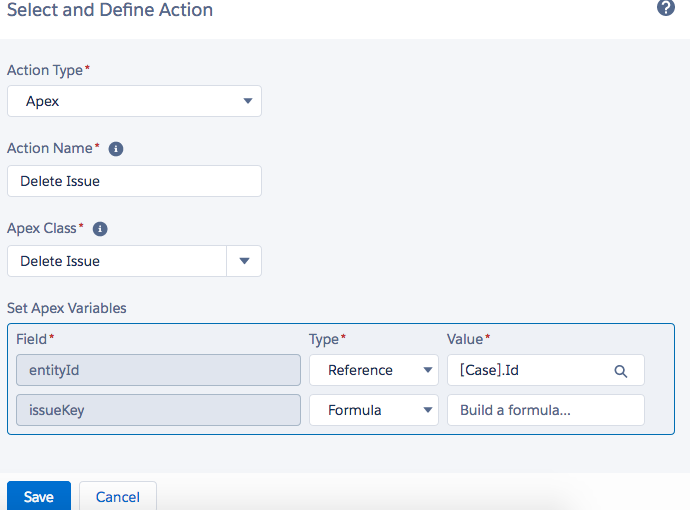
Errors during the Delete operation will be notified via email.