
Introduction
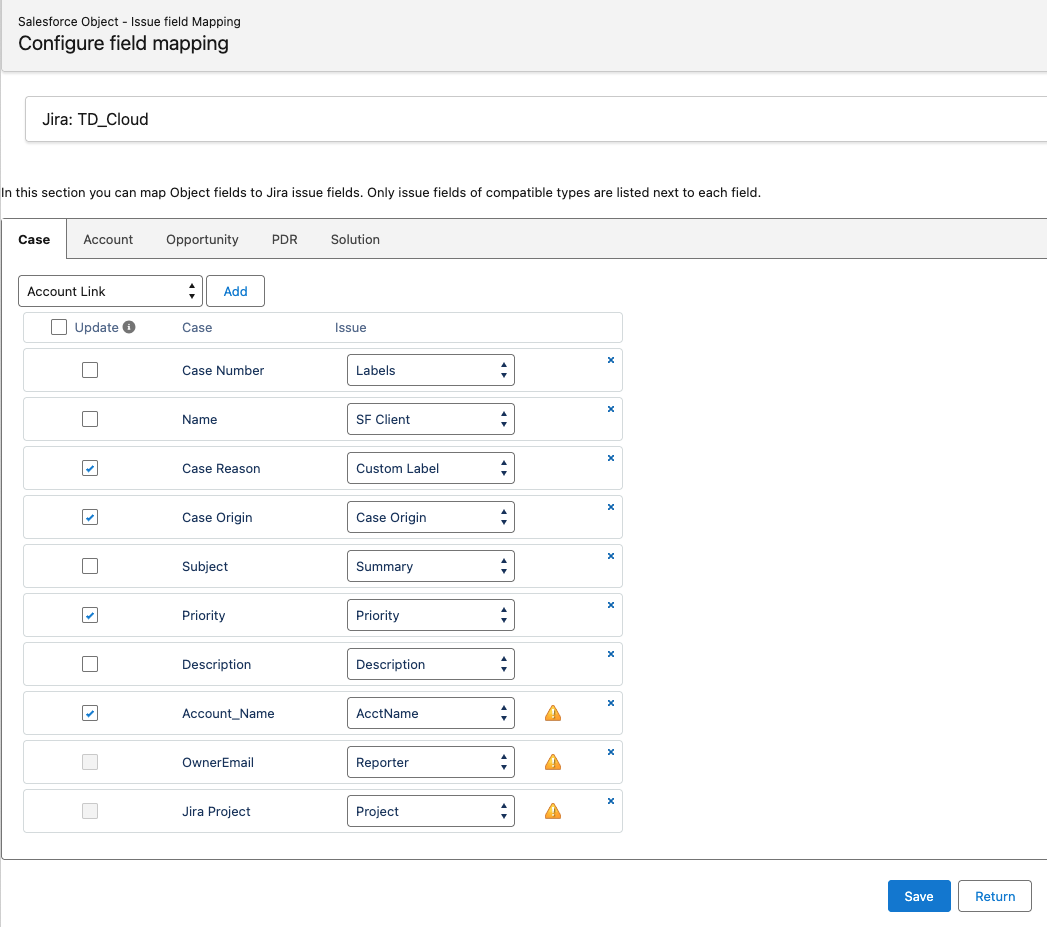
zAgileConnect supports field mapping from Case Fields to Jira Issue fields (standard and custom).
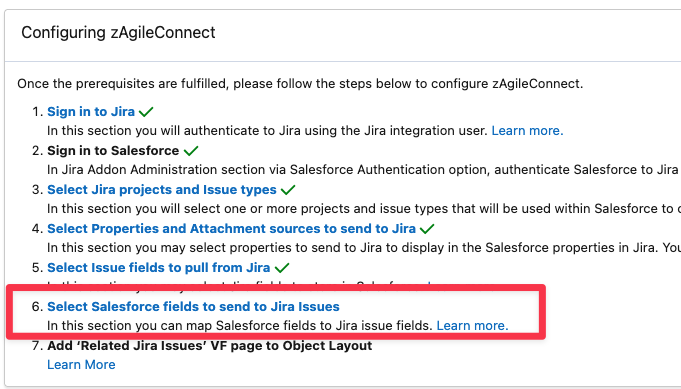
The configuration for mapping may be found in the package Configuration page.
Notes
-
Since Jira summary field is required, this field should be mapped to some compatible Case field during initial zAgileConnect setup
-
Please refer to the section below for compatibility in field mapping from Salesforce to Jira
-
Field mapping facilitates the following:
-
All mapped Issue fields are auto-populated during Issue Creation
-
Auto-creation of Issue from Case similarly uses the values from the mapped fields
-
Update issues using the values from the mapped fields. zAgileConnect will update only the issues that were created from Salesforce Case. Linked Issues do not support field mapping.
-
To ensure that a Jira Issue field is available for mapping from Salesforce Issue Creation, please make sure that this Issue field is configured in Jira’s Issue Creation screen.
Supported Issue Fields Types
Standard Fields
The following standard Jira Issue types are supported:
-
String (example: Summary, Description, Environment)
-
Component/s
-
Version/s (FixVersion/s, AffectsVersion/s)
-
Priority
-
Project
-
Issue Type
-
Date/DateTime (example: DueDate)
**Note: Issue Status may only be updated in Jira via workflow transitions
Custom Fields included in Jira
The following custom fields types are supported:
|
TYPE |
SCHEMA EXAMPLE |
|---|---|
|
array |
“schema“: {
}, schema“: {
} schema“: {
}, |
|
string |
“schema“: {
} “schema“: {
}, schema“: {
} “schema“: {
} |
|
project |
“schema“: {
} |
|
component/s |
“schema“: {
} |
|
version/s |
“schema“: {
}, schema“: {
} |
|
priority |
“schema“: {
} |
|
date |
“schema“: {
} |
|
number |
“schema“: {
}, |
|
datetime |
“schema“: {
} |
Custom Fields added by Third-party plugins
Custom fields provided by Third-party plugins may be mapped only if those are derived from Standard Fields or Custom Fields included in Jira like: version, labels, issuetype, component, version[], issuetype[], labels[], component[], etc.
**Jira Agile fields (Sprint, Epic, etc) are currently not supported
Supported Case Fields Types
The following Field Types are supported by zAgileConnect:
|
TYPE FIELD VALUE |
WHAT THE FIELD OBJECT CONTAINS |
|---|---|
|
|
Boolean ( |
|
|
Currency values |
|
|
Date values |
|
|
DateTime values |
|
|
Double values |
|
|
Email addresses |
|
|
Primary key field for an object |
|
|
Integer values |
|
|
Multi-select picklists, which provide a set of enumerated values from which multiple values can be selected |
|
|
Phone numbers. Values can include alphabetic characters. Client applications are responsible for phone number formatting. |
|
|
Single-select picklists, which provide a set of enumerated values from which only one value can be selected |
|
|
String values |
|
|
String values that are displayed as multiline text fields |
|
|
URL values that are displayed as hyperlinks |
Conversion from Salesforce Field Types to Jira Issue Field Types
|
Case \ Issue |
cascade select |
textfield |
textarea |
labels |
string |
string[] |
float |
number |
multicheckboxes |
datepicker |
datetime |
date |
select |
multiselect |
version |
version[] |
component |
component[] |
priority |
priority[] |
url |
project |
issuetype |
|---|---|---|---|---|---|---|---|---|---|---|---|---|---|---|---|---|---|---|---|---|---|---|---|
|
Boolean (Checkbox) |
|
|
|
|
|
|
|
|
|
|
|
|
|
|
|
|
|
|
|
|
|
|
|
|
Combobox |
|
|
|
|
|
|
|
|
|
|
|
|
|
|
|
|
|
|
|
|
|
|
|
|
Currency |
|
|
|
|
|
|
|
|
|
|
|
|
|
|
|
|
|
|
|
|
|
|
|
|
DataCategoryGroupReference |
|
|
|
|
|
|
|
|
|
|
|
|
|
|
|
|
|
|
|
|
|
|
|
|
Date |
|
|
|
|
|
|
|
|
|
|
|
|
|
|
|
|
|
|
|
|
|
|
|
|
Datetime |
|
|
|
|
|
|
|
|
|
|
|
|
|
|
|
|
|
|
|
|
|
|
|
|
Double |
|
|
|
|
|
|
|
|
|
|
|
|
|
|
|
|
|
|
|
|
|
|
|
|
|
|
|
|
|
|
|
|
|
|
|
|
|
|
|
|
|
|
|
|
|
|
|
|
|
EncryptedString |
|
|
|
|
|
|
|
|
|
|
|
|
|
|
|
|
|
|
|
|
|
|
|
|
ID |
|
|
|
|
|
|
|
|
|
|
|
|
|
|
|
|
|
|
|
|
|
|
|
|
Integer |
|
|
|
|
|
|
|
|
|
|
|
|
|
|
|
|
|
|
|
|
|
|
|
|
MultipickList |
|
|
|
|
|
|
|
|
|
|
|
|
|
|
|
|
|
|
|
|
|
|
|
|
Percent |
|
|
|
|
|
|
|
|
|
|
|
|
|
|
|
|
|
|
|
|
|
|
|
|
Phone |
|
|
|
|
|
|
|
|
|
|
|
|
|
|
|
|
|
|
|
|
|
|
|
|
Picklist |
|
|
|
|
|
|
|
|
|
|
|
|
|
|
|
|
|
|
|
|
|
|
|
|
Reference |
|
|
|
|
|
|
|
|
|
|
|
|
|
|
|
|
|
|
|
|
|
|
|
|
String (Text) |
|
|
|
|
|
|
|
|
|
|
|
|
|
|
|
|
|
|
|
|
|
|
|
|
TextArea |
|
|
|
|
|
|
|
|
|
|
|
|
|
|
|
|
|
|
|
|
|
|
|
|
Time |
|
|
|
|
|
|
|
|
|
|
|
|
|
|
|
|
|
|
|
|
|
|
|
|
URL |
|
|
|
|
|
|
|
|
|
|
|
|
|
|
|
|
|
|
|
|
|
|
|
Basic Types
-
If the value is null it will be passed on as null
-
From any type to String, TextField or TextArea is a direct conversion using String.valueOf().
-
Numbers (Double, Integer, Decimal, Long, etc.) are converted to type double
-
Boolean are converted to string values "true" or "false" when mapped to Text Jira fields. However if the Jira field target is multicheckboxes and it has multiple items then only the first item will be selected/unselected
-
Date is converted from Salesforce Date directly. For Datetime, it will take year, month and date, discarding any other value. The following format is used: yyyy-MM-dd
-
Datetime is converted from Salesforce taking the following format: yyyy-MM-dd\’T\’HH:mm:ss.SZ
-
String can be converted to Jira labels, words are split with blank spaces.
Complex Types
-
Salesforce’s Picklist and MultipickList to Jira String Array (string[]) – each value is taken and sent to Jira as an item (PickList) or an array (MultipickList) of String.
-
Salesforce’s Picklist and MultipickList to Jira array (priority[], component[], version[], etc.) — each item(s) is matched with name or value (project name, version name, component name, etc.) if these match then the id is added to the result.